What Is a Lead Capture Widget and Why Every Website Needs One ?
A lead capture widget is a small floating element, like a button or panel, that stays visible on your website at all times. It acts as a persistent call-to-action, allowing visitors to quickly submit their details and qualify themselves without leaving the page.
A good widget does more than show a call to action. The best ones use multi-step forms with short questions that guide visitors and qualify them as they go. By the time someone submits, you know what they need, their budget, and if they are a good fit. The lead is already warm.
This approach collects structured information:
- Name
- Phone number
- Project details
- Budget range
- Timeline
- Specific pain points
All information is formatted in a way that flows directly into your CRM and helps your sales team prioritize who to contact first.
Why Website Visitors Need a Constant Call-To-Action
Most people spend less than a minute on a website. Much of that time is spent deciding if they can trust you. They look for proof you have experience, that others have worked with you, and that your pricing is reasonable. This is the checklist most visitors use.
The decision to contact you is often impulsive. Maybe they read a testimonial, see a price that fits, or like your work, and decide to act. If the next step is clear, they reach out. If not, they leave and the opportunity is lost. This is why a floating widget works.
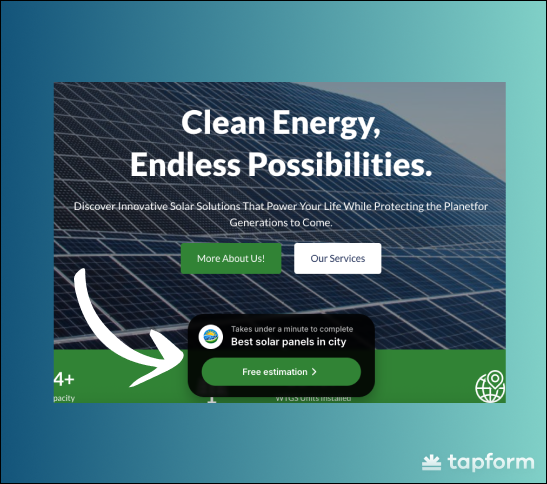
Visitors do not need to search for your contact page. The widget is always there, following them as they scroll, ready when they are. It removes friction before it becomes a problem. Web design tends to focus on how things look. The smarter question is usually how they work - and keeping a customer one click away from contacting you at all times is one of those fundamentals that drives real marketing results.
How a Lead Capture Widget Increases Conversions
Two things actually move the needle here. The first is visibility. A widget that's always in view gets opened more often than a form that requires navigation. That one's obvious once you say it out loud, but a lot of websites still bury their forms in places visitors never reach.
The second factor is the form format. Long forms reduce completion rates. When visitors see too many fields, most will close the widget. It is not that they do not want to contact you, but the effort seems too high. Multi-step forms solve this problem. They show one or two questions per screen and use a progress bar, so each answer feels manageable.
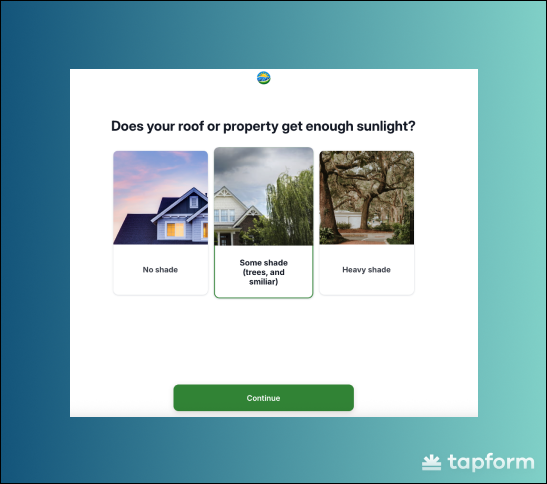
Visitors finish because each step is simple. The data you collect is more useful, with structured information that goes directly into your CRM and dashboard. The leads that come out the other side are qualified. Your team knows who they're calling before they pick up the phone.
This format also acts as a natural spam filter. Bots typically submit forms in one click. When a form requires multiple steps with conditional logic, most automated submissions fail. Real people continue through the steps. Fake ones drop off.
Widget Customization – Match Your Brand and Website Design
A generic widget is not just a design issue. It can reduce trust. Visitors notice, even subconsciously, when something on a page doesn't quite fit. A floating element with the wrong colors, no logo, and a default font reads as an afterthought.
And if the widget looks like it wasn't worth customizing, why would someone trust it with their contact information? Brand consistency matters here more than people give it credit for.
When the widget matches your website — colors, tone, logo — it feels like part of the product. That familiarity reduces hesitation.
The customization options on most form builders cover what you need:
Widget title — "Get a free estimate" or "Request a quote" — something direct that sets expectations
Label text — a line like "Takes under a minute" gives visitors the reassurance they need before opening the form
Button text — keep it action-oriented, "Start now" or "Get started" both work
Button colors — background and text color should match your brand palette, not the platform's defaults
Widget theme — dark or light. Around 90% of users choose dark for better visibility, and the numbers back it up. A widget that stands out gets opened more.
Widget Positioning – Where to Embed for Maximum Visibility
Center of the page. That's where this widget is placed — and there's a clear reason for that. It sits in a natural focal area, making it immediately noticeable without feeling aggressive or disruptive.
Visitors don't have to search for it in a corner. Placing the widget in the middle increases visibility and ensures it becomes part of the browsing experience rather than an afterthought. When positioned correctly, it stays noticeable without blocking important content.
Most platforms let you control the offset from the bottom of the page. The widget stays centered horizontally, and you adjust how high it floats above the footer. This matters more on mobile, where screen space is tighter.
You don't want distractions — but you also don't want missed opportunities.
Always visible by default — this is the recommended setting. Hiding the widget means missing leads. Our data shows that constant visibility increases both form opens and completed submissions. Only hide it if there is a clear, specific reason.
Hide on bottom — keeps the widget clear of the footer on mobile, so it doesn't overlap with navigation or other elements
Hide when scrolling — the widget disappears when someone scrolls down and reappears when they scroll up. This reduces visual movement on content-heavy pages, but it also reduces visibility. Use it sparingly.
The widget should work for you, not against you. If hiding it improves user experience without killing conversions, the option is there. But most of the time, keeping it visible wins.
Beyond Forms – Integrations and Smart Automation
Getting someone to fill out a form is just the first step. What happens next is what really matters.
When your widget connects to a CRM like HubSpot, every submission goes directly into the system. It's automatically tagged and assigned to the right person. No manual work. No copying and pasting.
Webhooks take it further. The moment someone submits the form, it can trigger email sequences, SMS messages, Slack alerts, and CRM updates. The right automation starts instantly, based on how the person answered.
Some platforms also use AI-powered automation. It can route chats, score leads, and assign them automatically. Leads with real intent — budget, timeline, decision-making authority — receive higher scores. Your sales team sees this before making the first call.
Manual data entry disappears. Leads arrive organized, routed, and ready to follow up. What used to take 15 minutes now takes two. Your team handles more leads — without hiring more people — and focuses only on the ones that matter most.
How a Lead Capture Widget Helps Qualify Leads Automatically
Not every lead is worth pursuing — and unqualified submissions waste time. A lead capture widget with multi-step logic solves this before it becomes a problem.
You define the rules (budget, location, project type), and the widget filters visitors automatically. Unqualified users are redirected or shown a different message before they ever reach your CRM.
Your team works only with pre-qualified leads, improving conversion rates and reducing wasted follow-ups. Built-in reporting shows where users drop off and which segments convert best — giving you insights that help optimize your entire marketing strategy.
Lead Capture Widget vs Online Chat – What's the Difference?
Both appear on your website and invite visitors to engage — but they serve different purposes.
Live chat is built for real-time conversations. It works best when someone is available to respond, or when you have a well-built chatbot. Without that, it can be hard to manage effectively.
A lead capture widget doesn't rely on live responses. It collects structured information at the visitor's pace, 24/7. With multi-step and conditional logic, it automatically qualifies leads before they enter your CRM.
Many businesses use both: a widget to capture and qualify leads, and chat to build relationships after the lead comes in.