How to create a lead capture form
Building a lead capture form that works is simple, but many businesses make mistakes right away. Often, businesses use a template, add too many fields, and place the form on their homepage. The form looks fine, and traffic is steady, but high-quality leads come in slowly.
The real issue is not the template. The way you build the form matters most. Which fields you include, their order, how the form works on mobile, how long it takes to finish, and what happens after submission all make a difference.
If you get these details right, your existing traffic will start converting into quality leads for your email marketing and sales. If not, your form will likely be ignored.
To consistently get qualified contacts, follow best practices for structure, question order, and user experience.
What is a lead capture Form
A lead capture form (also known as a lead generation form) is a tool used to collect information from potential customers. It helps businesses convert website visitors and the target audience into leads by gathering key details such as:
- Name
- Preferences
- Intent
Many leading online brands now use multi-step lead capture forms. Case studies have shown that lead capture forms increase conversion rates and improve the user experience.
These forms are now available to any business, not just large companies.
Types of Lead Capture Forms You Can Create
There are six major types of lead generation forms, and each works differently. Picking the right one depends on what you're trying to achieve with your offer.
Pop-up forms are usually located at the bottom of the lead capture page. They're bold, they're direct, and they grab attention.
Embedded forms fit into the page layout and are available when someone is ready to use them.
Multi-step forms split questions across several screens. The first screen might ask for an email address, the next for a name, and the next for the company details. Each step is short, so people are more likely to finish than with long, single-page forms.
Slide-in forms appear from the corner or bottom of your screen after someone's been reading for a bit. Less aggressive than pop-ups. They slide in quietly instead of taking over the whole page.
Chat forms ask one question at a time, like a conversation. "What's your biggest challenge?" Then, after they answer, "What's your budget?" Feels more natural than staring at a list of empty fields.
Gated content asks for something valuable in exchange for contact info. You have a guide or template. Visitors want it. They give you their email to get it. Works when what you're offering is actually worth an email address.
Step-by-Step Guide: How to Create a Lead Capture Form
After you have decided what type of lead form you need for your business (B2B, SaaS, local business…), it is time to create it. Thanks to form builders like Tapform, you can create a high-converting lead capture landing page in under a minute.
Define the Goal of Your Form
Know what your form needs to accomplish before you start building it. Multi-step forms need this clarity upfront.
Think, are you trying to:
- Generate potential customers for your business?
- Build an email list for your newsletter?
- Generate leads for your sales team?
- Register people for a webinar?
- Gather feedback from customers?
- Generate demo requests?
Each goal needs a different approach. For example, if you want to build an email list, your form might only need two steps: first ask for an email, then ask for name and preferences.
If you are qualifying leads for sales, you may need more steps that build commitment as users move through the form.
The commitment ladder in practice:
- Step 1-2: Qualifying questions (What's your situation? What are your needs?)
- Step 3-4: Intent questions (What's your budget range? When do you need this?)
- Step 5-6: Contact information (Now that they're invested, ask for name, email, phone)
Design & Styling
Your form design should match your brand. The colors and style need to be consistent with your website.
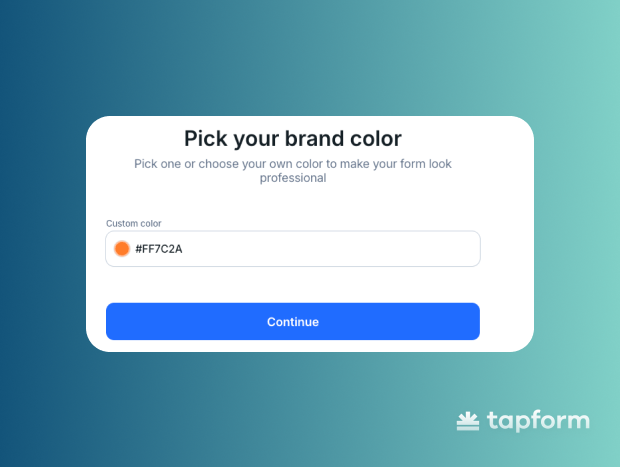
Your primary color handles the main actions:
- CTA buttons ("Continue", "Get Started")
- Progress bars showing how far along they are
- Active field borders when clicked
- Success checkmarks after each step
Group fields logically
Group related fields together to make your form easier to complete. People think in categories, so matching this helps the process go smoothly.
If your form fields jumps between topics, users have to switch between different types of information. This creates friction and can lower conversions. You can see how a solar company structures its multi-step lead-capture form using logical field grouping.
Notice how the questions progress from general to specific, building commitment naturally:
- What type of property do you own?
- Does your roof or property get enough sunlight?
- What’s your average monthly electric bill?
- What are your main reasons for considering solar?
- Do you need financing?
- When would you like this service completed?
- Contact info
Add Multi Step Segments
After you define your steps, add the right fields to each one. Each step should match a part of the user journey, and the fields should support that purpose.
Only include fields that help you capture leads, guide the user, or move them toward the final action. Leave out anything unnecessary.
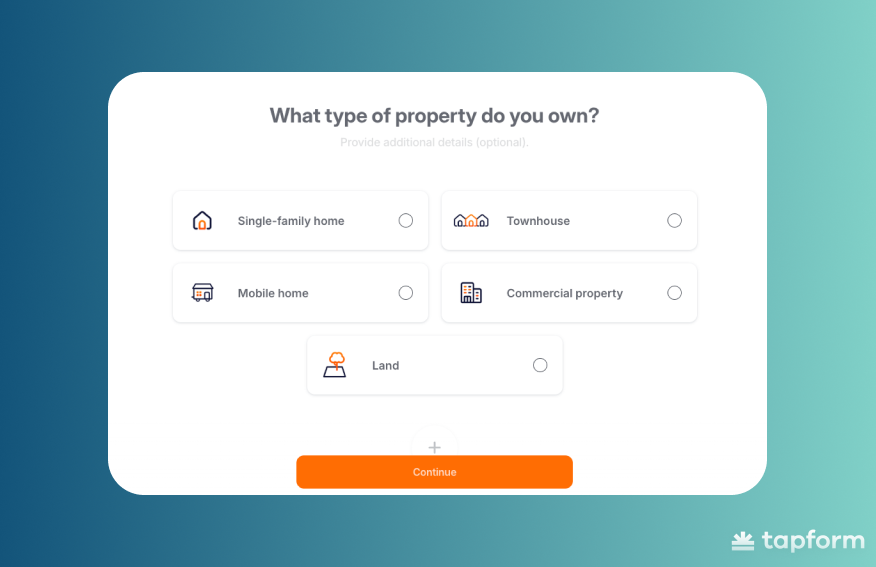
A form with logical, natural flow between steps will convert better.
Style Your Form
Styling matters. Adjust the layout, spacing, and answer style to help users move through the form easily.
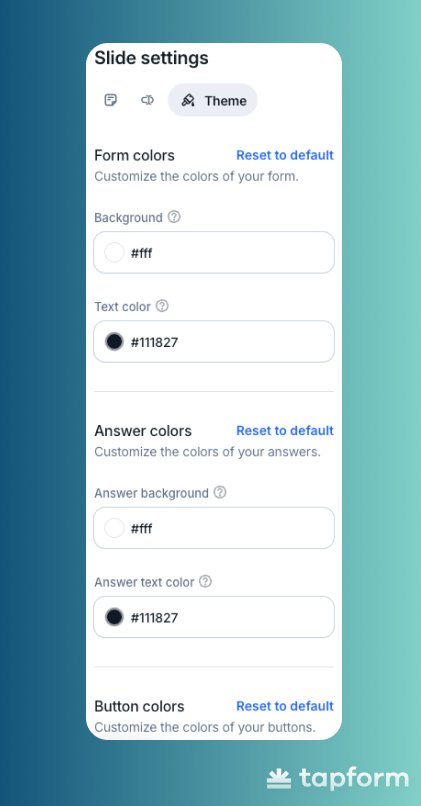
In the settings, you can choose how answers are shown - card, grid, or lisChoose how answers are shown, such as card, grid, or list. Use the layout that makes questions easy to scan. A clean layout helps users decide faster. Blocks should have enough space between them, and the active state should be easy to notice when someone selects an option.
Connect CRM Integrations
After building your form, connect it to your lead management system.
Integrations send each submission directly to your CRM or email tool. This removes the need for spreadsheets or manual data entry.
With integrations, a lead's answers can appear instantly in your CRM, trigger an email sequence, assign a task to your sales team, or connect to other tools you use.
Without integrations, your form is just collecting data. Without integrations, your form only collects data. With them, it supports your follow-up process. Figuring out where to put it is what actually matters.
Many people put forms on their homepages because they get the most traffic. However, high traffic does not always mean high intent. Visitors on your homepage may just be learning about your business, while those on your pricing page are closer to making a decision.
Place your forms where visitor intent is highest. Pricing pages often convert better than homepages. Feature comparison pages, blog posts about specific problems, and case studies can also be effective locations.
Test & Optimize Performance
The first version of your form is rarely the best. User behavior may show that some fields cause people to leave, while a simple clarification can increase completions.
Is mobile-first design essential for lead capture forms?
Yes. Over 60% of traffic comes from mobile, but most forms are designed for desktop first. This leads to lower mobile conversion rates.
Mobile-first design is now essential. It can be the difference between gaining a lead and losing one to a competitor with a better mobile experience.Here are a few stats that explain why:
- Mobile dominates: over 58–62% of all web traffic now comes from mobile devices.
- People spend an average of 4.9 hours per day on their phones.
- 82% of users expect to complete essential forms on mobile.
- 68% prefer forms that work with simple one-thumb use.
- Over 73% of all digital interactions now occur on mobile devices.
- Mobile commerce is growing fast, already at 57% of all transactions and still rising.
Can multi-step forms capture more qualified leads?
Multi-step forms can help you get more qualified leads. By asking questions in steps, you filter out less interested visitors and guide serious prospects to completion.
Here is why multi-step forms can deliver higher-quality leads:
- Users self-qualify: completing multiple steps shows real intent, not casual interest.
- Better data for sales: you get needs, budget, and timeline — not just a name and email.
- Micro-commitments boost completion: each step increases users' likelihood of finishing.
- Smart routing: send the right lead to the right team based on their answers.
- Proven results: many B2B teams report 30% more qualified leads with multi-step flows.